



Nobody joins a law firm because they enjoy chasing passport scans through email threads.
Yet for many legal teams, client onboarding still means requesting documents manually, checking whether everything has arrived, moving information between systems and following up when something is missing.
The checks matter. The administrative headache does not have to.
Goidentity gives law firms a straightforward way to send, track and review digital identity checks, alongside PEP and sanctions screening, location verification and tailored onboarding questions. It helps staff collect the information they need through a clearer journey, without introducing a platform that takes weeks to understand. You can see the full onboarding workflow on your page about client identity verification for legal teams.
What does the staff journey look like?
Goidentity is designed around a simple idea: the technology behind identity verification can be sophisticated without making the staff experience complicated.
Here is the journey a member of staff follows in practice.
1. Log in and see what needs attention
Staff log in through the Goidentity website and arrive at a clear dashboard.
The dashboard shows the firm's available balance and an overview of its verification activity, including checks that are:
- New
- In progress
- Successful
- Failed
- Waiting for review
This gives staff an immediate view of what has been completed and which checks may need attention. They can also see whether there is enough money in the account before starting another verification.
If the balance is running low, a user can select Top up, choose an amount and continue to payment. There are no licences or unused seats to manage. The balance is used only when the firm runs a check.
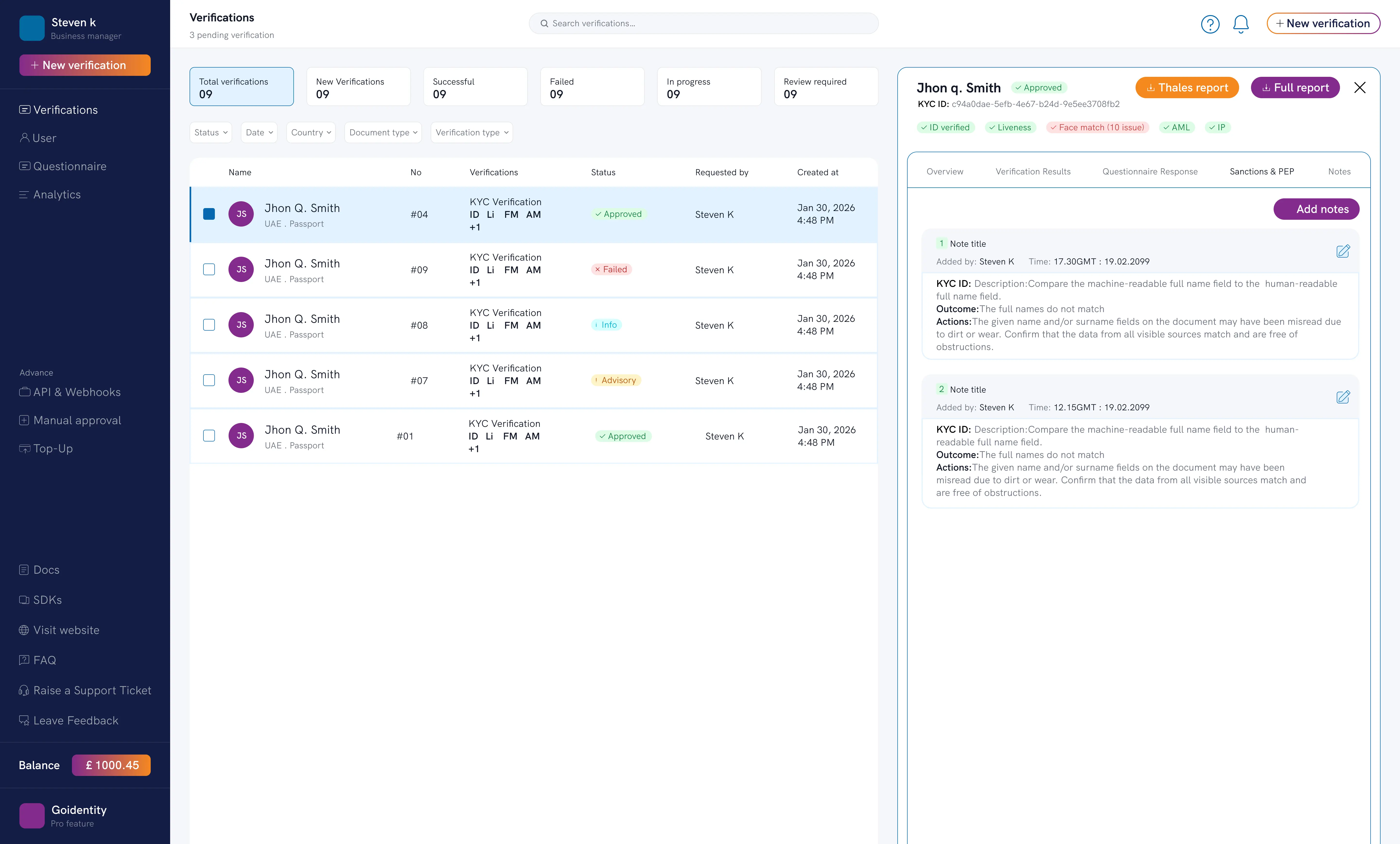
See the available balance and the status of current verifications as soon as you log in.
2. Select “Verify person” and enter the client details
To begin, the staff member selects Verify person and enters a small amount of information about the client:
- Full name
- Date of birth
- Telephone number
- Country of the identity document
The full name should match the name shown on the identity document. Goidentity makes that clear at the point of entry, helping staff avoid a preventable mismatch before the check is sent.
If the name is different, the system does not simply hide the issue. It can return the result for review so the firm can investigate and apply its own judgement.
3. Choose the checks needed for that client
The staff member then selects the services required for the journey.
Options include:
- ID document and facial biometric verification
- PEP and sanctions screening
- GPS location verification
- A tailored onboarding questionnaire
The options can be combined, allowing the firm to create a journey that reflects the information it needs instead of running separate processes across several systems.
Before the request is sent, Goidentity displays the cost of the selected journey alongside the current balance. Staff can see exactly what the check will cost and what the remaining balance will be.
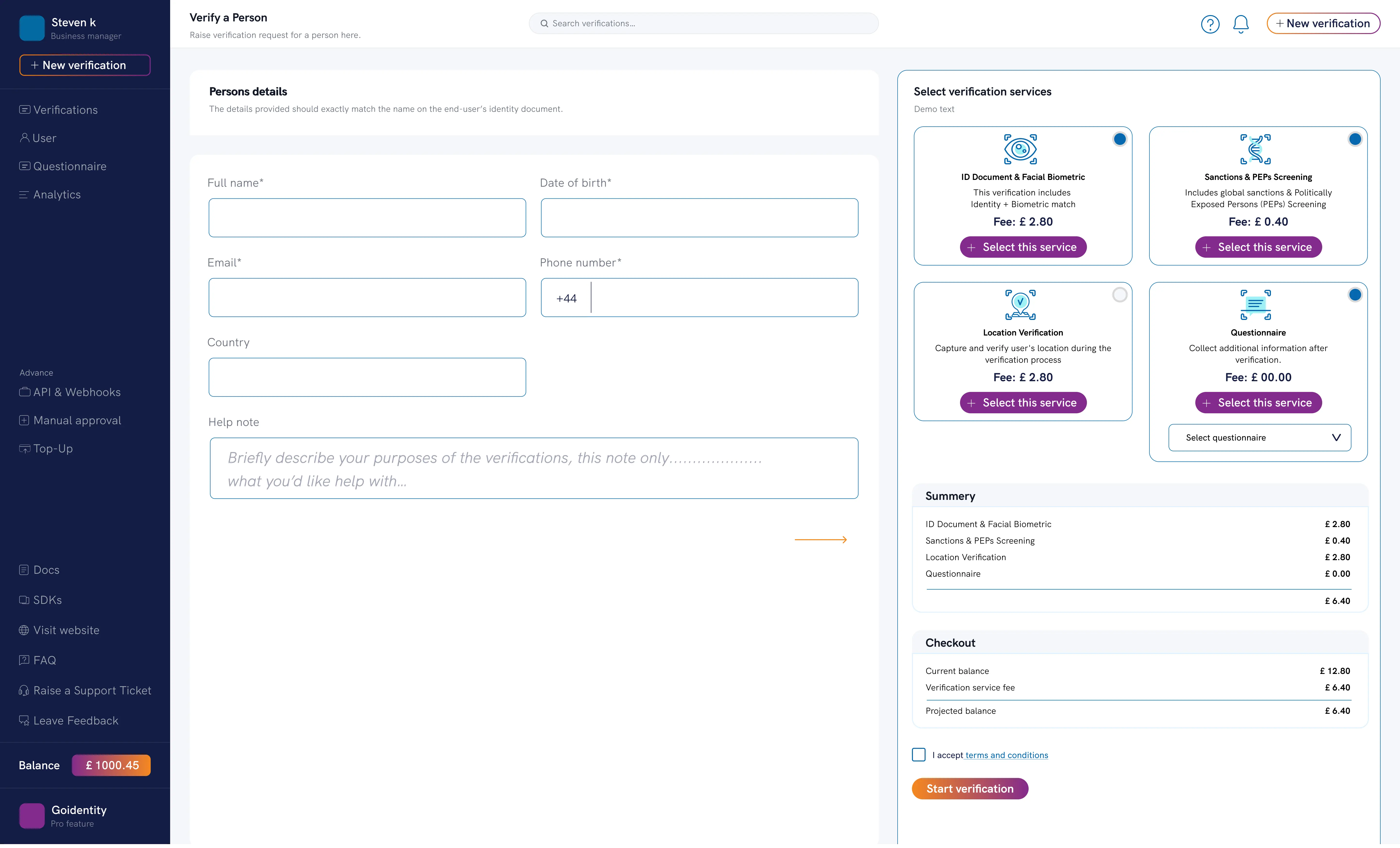
Choose the checks you need and see the price before sending the request.
4. Send one guided journey to the client
After accepting the terms and starting the verification, the client receives an invitation and a unique six-digit code.
The invitation links the client to the Goidentity app in the Apple App Store or Google Play Store. Once the client has downloaded the app and entered the code, it guides them through the selected journey.
Depending on the services selected, the client may be asked to:
- Scan a passport or driving licence
- Take a selfie and complete a liveness prompt
- Allow location access for GPS verification
- Answer the firm's onboarding questions
Questionnaires can use short text, long text, dates and dropdown selections. This allows the firm to ask structured questions within the same journey rather than sending another form afterwards.
Staff do not need to arrange an appointment simply to inspect an identity document or rely on a passport image being sent as an ordinary email attachment.
5. Track progress from the dashboard
Once the invitation has been sent, the dashboard shows that the verification is in progress.
Staff can see whether the client has completed the journey without searching through email threads or keeping a separate tracking sheet. When the check is finished, its status and result are returned to the dashboard.
Some checks may be marked as requiring review rather than being automatically failed. A name mismatch is a good example. It could indicate an issue, or it might be a genuine difference that the firm can understand and document.
This keeps the firm in control instead of asking software to make every decision on its behalf.
6. Review and download the full report
Selecting a completed verification opens the detailed report.
Depending on the checks selected, staff can review:
- The client's details
- When the invitation was sent and opened
- The identity document and extracted information
- Document authenticity and tampering checks
- The verification outcome
- PEP and sanctions screening results
- GPS location information
- Answers to the firm's questionnaire
The report can also be downloaded for use within the firm's record-keeping process.
This creates a clear hand-off between collecting information and applying professional judgement. Digital identity technology can make collection and verification more efficient, but it does not replace a law firm's risk-based decisions. The Solicitors Regulation Authority confirms that firms retain responsibility for client due diligence, even when using a third-party digital identity service.
Goidentity gives staff better tools and clearer information. The firm remains in control of the decision.
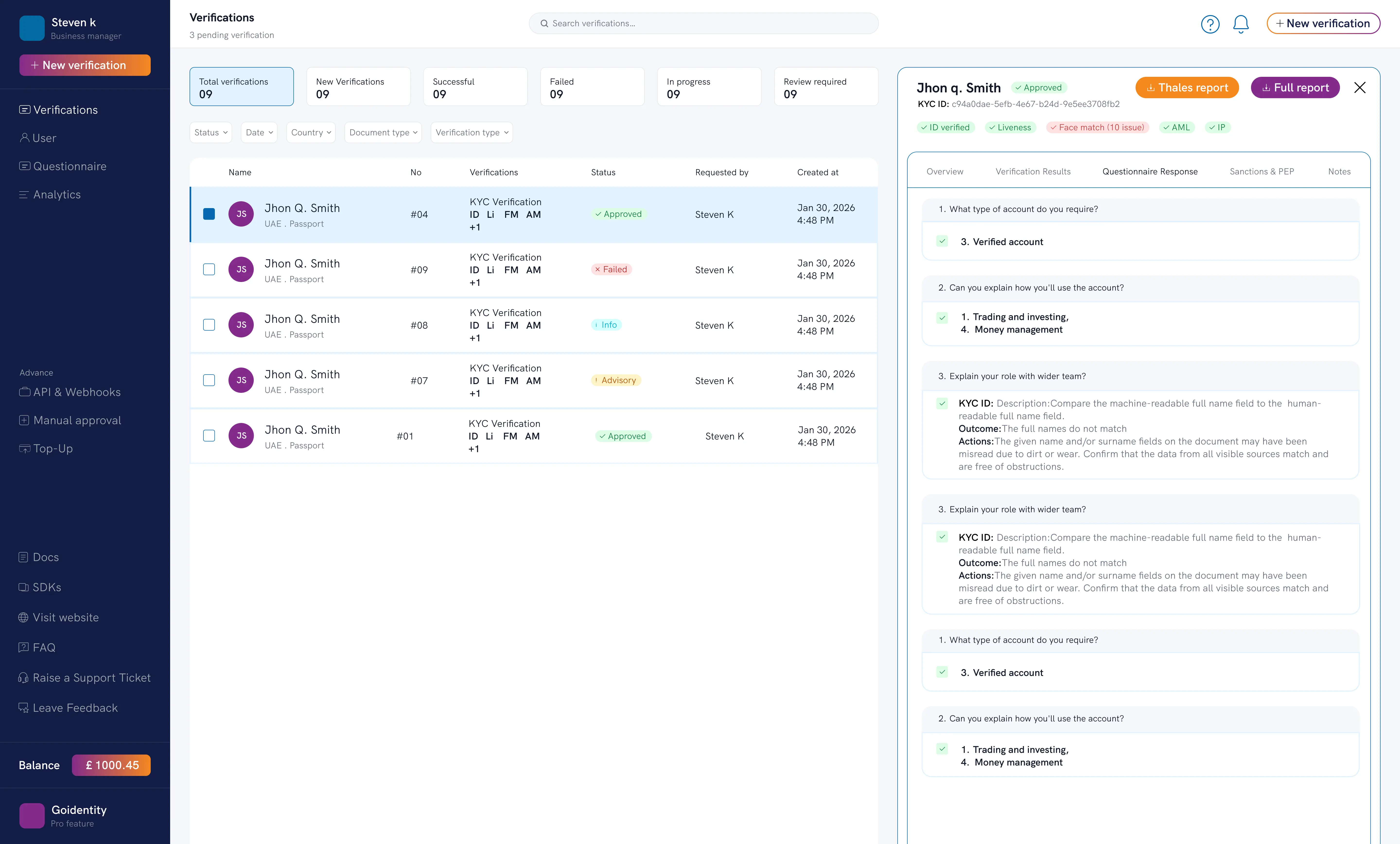
Review the verification evidence and questionnaire responses, then download the report.
7. Create reusable questionnaires without technical support
Not every legal matter requires the same questions.
A conveyancing team may need a different journey from a private-client or corporate team. Goidentity includes a straightforward questionnaire builder that works like a familiar online survey tool.
Staff can create a questionnaire, add the required fields and reuse it when starting future checks. Available answer types include short text, long text, dates and dropdown choices.
This gives firms control over the additional information collected during onboarding without needing a developer to create every new form.
Simple to operate and simple to buy
Ease of use is not only about what appears on the screen. It is also about whether the service fits the way a law firm operates.
Many identity platforms were designed around the volumes and budgets of major banks. Smaller firms may be asked to commit to minimum volumes, multiple seats or a long agreement before they know whether the product is right for them.
Goidentity uses a flexible top-up model. The dashboard shows the balance, the cost is displayed before each journey is sent and the billing area provides an itemised record of checks and top-ups.
Firms add money when they need it and pay for the checks they run. There is no long-term contract and no requirement to keep purchasing checks.
We do not think a restrictive contract should be the reason a customer stays.
We would rather make the platform simple enough, and provide a service good enough, that customers choose to keep using it.
What does this mean for a legal team?
For a small or medium-sized firm, the journey can mean:
- Less administrative time spent collecting identity documents
- A clearer view of checks in progress
- A more consistent onboarding process
- Fewer systems, forms and email threads to follow
- A smoother experience for remote clients
- Clearer evidence for staff to review and record
- More time for fee-earning and client-facing work
The technology behind the check may be complex. Using it should not be.
See Goidentity with one of your own workflows
The best way to judge whether a platform is genuinely easy to use is to see it in action.
We can demonstrate Goidentity in 15 minutes using a journey tailored to one of your firm's common matter types. There is no slide presentation and no obligation to continue. We will show you how a member of staff selects and sends a check, what the client experiences, how progress is tracked and what appears in the final report.